
What is REST?
In 2000, Roy Fielding, one of the principal authors of the HTTP specification, proposed an architectural approach for designing web-services known as Representational State Transfer (REST).
Note that, while this article assumes REST implementation with HTTP protocol, REST is not tied to HTTP. REST API’s are implemented for a “resource” which could be an entity or service. These API’s provide way to identify a resource by its URI, which can be used to transfer a representation of a resource’s current state over HTTP.
Why Is API Design So Important?
People ask this question quite a lot, and to answer this:
REST APIs are the face of any service, and therefore they should:
1. Be easy to understand so that integration is straightforward
2. Be well documented, so that semantic behaviors are understood (not just syntactic)
3. Follow accepted standards such as HTTP
Designing and Developing Highly Useful REST APIs
These conventions are as follows:
1. Use Nouns in URI
REST API’s should be designed for Resources, which can be entities or services, etc., therefore they must always be nouns. For example, instead of /createUser use /users
2. Plurals or Singulars
Generally, we prefer to use plurals but there is no hard rule that one can’t use singular for resource name. The ideology behind using plurals is:
We are operating on one resource from collection of resources so to depict collection we use plural
For example, in the case of…
GET /users/123
the client is asking to retrieve a resource from users collection with id 123. While creating a resource we want to add one resource to current collection of resources, so the API looks like the below…
POST /users
3. Let the HTTP Verb Define Action
As per point #1 above, API’s should only provide nouns for resources and let the HTTP verbs (GET, POST, PUT, DELETE) define the action to be performed on a resource.
The table below summarizes use of HTTP verbs along with APIs:
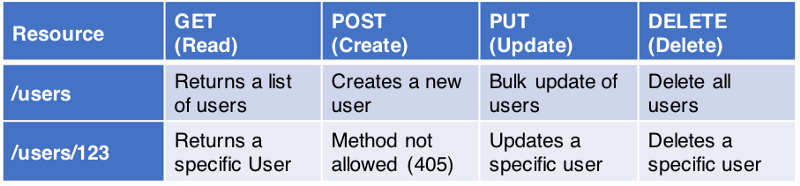
4. Don’t Misuse Safe Methods (Idempotency)
Safe methods are HTTP methods which return the same resource representation irrespective of how many times are called by client. GET, HEAD, OPTIONS and TRACE methods are defined as safe, meaning they are only intended for retrieving data and should not change a state of a resource on a server. Don’t use GET to delete content, for example…
GET /users/123/delete
It’s not like this can’t be implemented, but HTTP specification is violated in this case.
Use HTTP methods according to the action which needs to be performed.
5. Depict Resource Hierarchy Through URI
If a resource contains sub-resources, make sure to depict this in the API to make it more explicit. For example, if a user has posts and we want to retrieve a specific post by user, API can be defined as GET /users/123/posts/1 which will retrieve Post with id 1 by user with id 123
6. Version Your APIs
Versioning APIs always helps to ensure backward compatibility of a service while adding new features or updating existing functionality for new clients. There are different schools of thought to version your API, but most of them fall under two categories below:
Headers:
There are 2 ways you can specify version in headers:
Custom Header:
Adding a custom X-API-VERSION (or any other header of choice) header key by client can be used by a service to route a request to the correct endpoint
Accept Header
Using accept header to specify your version such as
=> Accept: application/vnd.hashmapinc.v2+json
URL:
Embed the version in the URL such as
POST /v2/users
We prefer to use URL method for versioning as it gives better discoverability of a resource by looking at the URL. Some may argue URL refers to the same resource irrespective of version and since response representation may or may not change after versioning, what’s the point of having a different URL for the same resource?
I am not advocating for one approach over another here, and ultimately, the developer must choose their preferred way of maintaining versions.
7. Return Representation
POST, PUT or PATCH methods, used to create a resource or update fields in a resource, should always return updated resource representation as a response with appropriate status code as described in further points.
POST if successful to add new resource should return HTTP status code 201 along with URI of newly created resource in Location header (as per HTTP specification)
8. Filter, Search and Sort
Don’t create different URIs for fetching resources with filtering, searching, or sorting parameters. Try to keep the URI simple, and add query parameters to depict parameters or criteria to fetch a resource (single type of resource)
Filtering:
Use query parameters defined in URL for filtering a resource from server. For example, if we would like to fetch all published posts by user you can design an API such as:
GET /users/123/posts?state=published
In the example above, state is the filter parameter
Searching:
To get the results with powerful search queries instead of basic filters, one could use multiple parameters in a URI to request to fetch a resource from server.
GET /users/123/posts?state=published&ta=scala
The above query searches for posts which are published with the Scala tag. It’s very common today for Solr to be used as search tool as it provides advanced capabilities to search for a document and you can design your API such as:
GET /users/123/posts?q=sometext&fq=state:published,ta:scala
This will search posts for free text “sometext”(q) and filter results on fq state as published and having tag Scala.
Sorting:
ASC and DESC sorting parameters can be passed in URL such as:
GET /users/123/posts?sort=-updated_at
Returns posts sorted with descending order of update date time.
9. HATEOAS
Hypermedia As Transfer Engine Of Application State is a constraint of the REST application architecture that distinguishes it from other network application architectures.
It provides ease of navigation through a resource and its available actions. This way a client doesn’t need to know how to interact with an application for different actions, as all the metadata will be embedded in responses from the server.
To understand it better let’s look at the below response of retrieve user with id 123 from the server:
{
“name”: “John Doe”,
“links”: [
{
“rel”: “self”,
http://localhost:8080/users/123
},
{
“rel”: “posts”,
http://localhost:8080/users/123/posts
},
{
“rel”: “address”,
http://localhost:8080/users/123/address
}
]
}
Sometimes it’s easier to skip the links format, and specify links as fields of a resource as below:
{
“name”: “John Doe”,
http://localhost:8080/users/123
http://localhost:8080/users/123,
http://localhost:8080/users/123/address
}
It’s not a convention you need to follow every time, as it depends on resource fields/size, and actions which can be performed on resource. If resources contain several fields that the user may not want to go through, it’s a good idea to show navigation to sub-resources then implement HATEOAS.
10. Stateless Authentication & Authorization
REST APIs should be stateless. Every request should be self-sufficient and must be fulfilled without knowledge of the prior request. This happens in the case of Authorizing a user action.
Previously, developers stored user information in server-side sessions, which is not a scalable approach. For that reason, every request should contain all the information of a user (if it’s a secure API), instead of relying on previous requests.
This doesn’t limit APIs to a user as an authorized person, as it allows service-to-service authorization as well. For user authorization, JWT (JSON Web Token) with OAuth2 provides a way to achieve this. Additionally, for service-to-service communication, try to have the encrypted API-key passed in the header.
11. Swagger for Documentation
Swagger is a widely-used tool to document REST APIs that provides a way to explore the use of a specific API, therefore allowing developers to understand the underlying semantic behavior. It’s a declarative way of adding documentation using annotations which further generates a JSON describing APIs and their usage.
We have created a Maven Archetype which can get you started here: Maven Archetype.
12. HTTP Status Codes
Use HTTP status codes to provide the response to a client. It could be a success or failure response, but it should define what the respective success or failure means from a server perspective.
Below are the categories of responses by their status codes:
2xx Success
200 OK: Returned by a successful GET or DELETE operation. PUT or POST can also use this, if the service does not want to return a resource back to the client after creation or modification.
201 Created: Response for a successful resource creation by a POST request.
3xx Redirection
304 Not Modified: Used if HTTP caching header is implemented.
4xx Client Errors
400 Bad Request: When an HTTP request body can’t be parsed. For example, if an API is expecting a body in a JSON format for a POST request, but the body of the request is malformed.
401 Unauthorized: Authentication is unsuccessful (or credentials have not been provided) while accessing the API.
400 Forbidden: If a user is not Authorized to perform an action although authentication information is correct.
404 Not Found: If the requested resource is not available on the server.
405 Method Not Allowed: If the user is trying to violate an API contract, for example, trying to update a resource by using a POST method.
5xx Server Errors
These errors occur due to server failures or issues with the underlying infrastructure.