

CareerOS
Find your next career step
Download the desktop app
The Windows preview is unsigned and requires Windows 11. Use macOS for engineering missions.
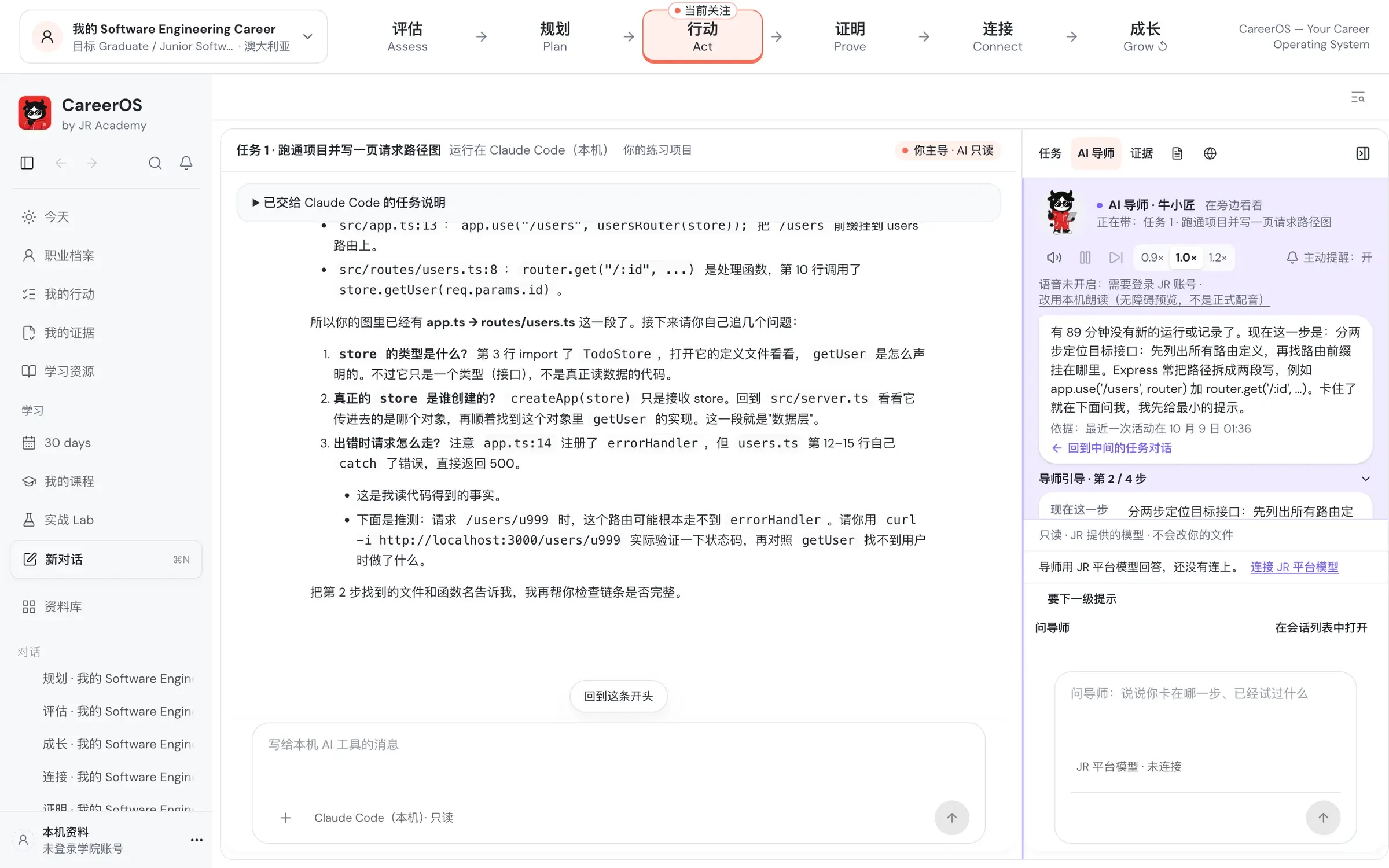
Why not just take another course
Courses alone aren't enough. Most people get stuck on one of these three
Employers want to see what you've actually built
- Free
AI keeps changing what jobs ask for
How CareerOS works
The first two steps are free on the web. The other four happen in the desktop app.
The order never changes: Assess, Plan, Act, Prove, Connect, Grow. After Grow you take the new feedback back to Assess.
Step 1 Assess and step 2 Plan are free on the JR Academy website; step 3 Act is on the website too: work through this week's plan, reading the chapters in place with the AI tutor beside you. Missions on real projects, Prove, Connect and Grow happen in the CareerOS desktop app.
Chris · final semester of a Master of Accounting → Junior Data AnalystAssess · Gap list
Gap list (in the order to work on)
- Skill: SQL queries and joins, missing from the résumé while the job asks for strong SQL
- Evidence: no dashboard an employer can open, while the job asks for Power BI or Tableau
- Experience: hasn't used data to make a decision in a team
- Presenting: not yet confident explaining findings in English to non-technical colleagues
- STEP 01 · ASSESS
Assess · Web · free
What you doDescribe where you are and the role you want. Add your resume or a job ad and the picture gets sharper.
What you end up withA list of where you stand and what's missing, each point with its source.
- STEP 02 · PLAN
Plan · Web · free
What you doOrder the gaps and fit them into the hours you actually have each week, with the matching course, certification or project.
What you end up withA week-by-week plan that says what each week produces.
- STEP 03 · ACT
Act · Website
What you doDo this week's plan: read the week's chapters in place, learn with the AI beside you, tick each task as you finish, and the next week comes up when this one is done.
What you end up withWeekly progress on your plan and each week's deliverable.
- PROJECT · PROVE → GROW
Project missions · Prove · Connect · Grow · CareerOS desktop
What you doWork on tasks in a real project, pin your code changes, test results and write-up as versions, match them against a job ad for your application, and log interview feedback.
What you end up withA portfolio employers can check, and application material to go with it.
Assess stage
Drop your resume into the chat. The AI proposes with quotes. You confirm.
This is the Assess stage: you drop material into the chat, CareerOS reads it on your machine, and the AI turns where you stand into a card that quotes the source for every line. When you confirm, the steps on the right tick themselves off.
- Material is read on your machine; original files are not sent to the AI
- Every proposal quotes its source and is saved only after you confirm
- Work rights are entered by you only; the AI never reads or guesses them
Assess · My Software Engineering CareerAnswered by local Claude Code · read-only, no tools
Send me your resume and the role you want — just drag them in. I'll turn where you stand into a card that quotes the source for every line. Nothing is saved until you confirm.
The six-stage loop
Assess → Plan → Act → Prove → Connect → Grow, then around again
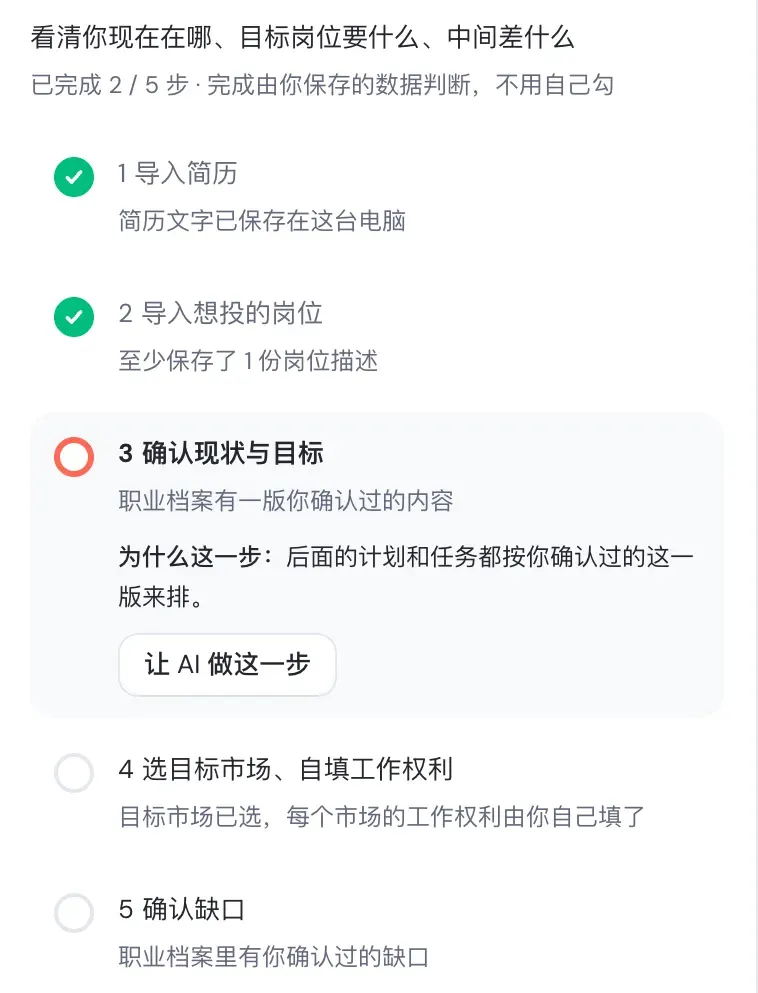
The top of the app always shows your career profile and these six stages. Open a stage and the centre becomes that stage's conversation, while the right panel lists the steps for it. Grow records interview results and feedback, then takes you back to Assess or Plan with new information.
Assess
What you do here
Drop your resume (PDF or DOCX) and a job description into the chat. The AI summarises where you are, where you want to go and the gaps between, quoting the source for every item. You confirm each one.
What it leaves behind
A sourced picture of where you stand: strengths, unknowns, and constraints such as time and location.
Steps on the right
- 1Import your resume
- 2Import a role you want
- 3Confirm the AI's summary of current state and goal
- 4Choose target markets; you fill in work rights yourself
- 5Confirm the gaps
CareerOS Skills
"Analyse my resume" means different things for a Graduate and a Senior
CareerOS packages abilities such as resume analysis, JD matching and cover letters as skills, then picks the most specific version for your role family × level × target market. If no specific version exists it falls back to the general one and says so in the chat.
First planned skills
- Resume analysis
- JD matching
- Resume tailoring
- Cover letter
- STAR stories
- Interview questions
- Referral message
- GitHub README
- Salary negotiation
Role families and levels
- Software Engineer · Data Analyst · Business Analyst · DevOps / Cloud · AI Engineer · Product Manager
- Intern / Graduate · Junior · Mid · Senior · Lead
Software Engineer at every level × Australia comes first. Other combinations use the general version, labelled as such under each result.
Switch career profile
Version usedSoftware Engineer · Intern / Graduate · Australia
10 criteriaCriteria checked one by one
- Level-specificProjects listed before work experience
- Level-specificKept to one page
- Level-specificGPA shown with its scale
- Level-specificProjects show the problem, your part and a link
- Level-specificShows testing and pull-request habits
- Level-specificShows learning speed and what you owned
- Tech keywords inside project and work bullets
- Skills, Projects and Experience sections present
- How you use and check AI coding tools
- Australian contact details and format
The AI's first suggested fix
“This is the only evidence on the whole resume, but it only lists technologies. It doesn't show what problem it solved, what you were responsible for or the hardest problem, and a reviewer can't open the project.”
Each criterion is only judged as met, partly met or not seen. CareerOS counts them; it is not a score.
The same resume is analysed under three career profiles. The suggestions shown are translated from the AI’s original Chinese responses.
Courses, certifications, P3 and job search
JR Academy's other products show up in CareerOS where your gaps are
These are entry points you can see in CareerOS. Accounts, purchases and usage stay in each product; nothing has been merged.
- Plan · ActCourses and bootcamps
Recommended in Plan for your skill gaps, taken during Act.
- Plan · ProveCert Master
Certificates a target role asks for appear in your plan; one you've passed is proof an employer can check.
- Act · ProveP3 team projects
Build teamwork experience, recorded as a team project, not an internship.
- ConnectJobpin and career coaching
Pick roles, write resumes and applications against the requirements, and prepare interviews with a mentor.
- Connect · GrowEvents and community
Meet people heading the same way; hackathons also add project experience.
The 30 days series
30 days: a planned 30 days, built inside CareerOS
30 days is a series. Each course is a planned 30 days: one theme, Day 1 to Day 30, a small deliverable every day, moving forward by date.
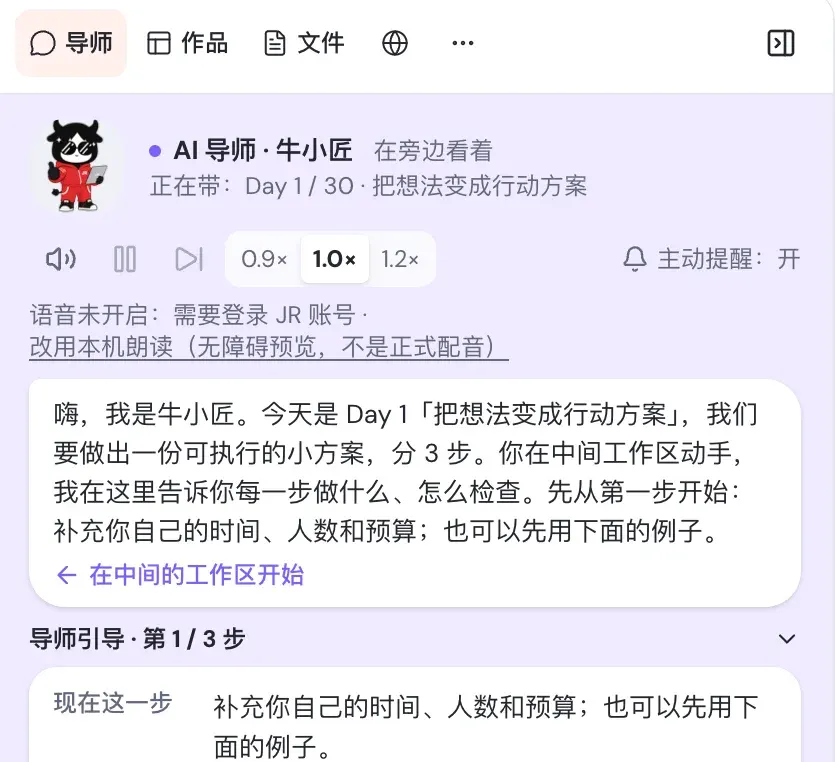
- Each day you build it in the centre workspace with your local Claude Code or Codex, not just read about it.
- The AI tutor on the right walks you through each step and how to check it.
- The day's work can be pinned as evidence and added to your portfolio.
AvailableMaster AI in 30 days (30 天玩转 AI)A$69 + GST · one-off purchase
In preparation- 30 days of hands-on DevOps
- 30 days to your company's first AI automation
- 30 days to build your first app with AI
- 30 days to build your AI knowledge base
Courses in preparation are not on sale yet and have no price.
Where it stands
What you can do now, and what the pilot brings
The signed macOS release is available for Apple silicon and Intel Macs. An unsigned Windows 11 preview is also available. The first career pilot is still being prepared.
- Pilot not open yet
- macOS download available (Apple silicon / Intel)
- CareerOS pricing not announced
- macOS release · Windows 11 preview
You can do today
- Download CareerOS for macOS (Apple silicon or Intel) and connect your own Claude Code or Codex
- Learn about the first live 30 days course, Master AI in 30 days
- Book 1:1 career coaching to talk through your target role
- Tell us your target role on the contact page and we will reach out when the pilot opens
When the pilot opens
- Start from your resume and target role, go through all six stages and leave with a portfolio and application material
- The first complete track, Junior Software Engineer: 12 tasks over about 5 weeks
Later stages
- Human mentor review and real projects
- Time-limited, revocable portfolio sharing
- A stable Windows release, Linux, and dedicated skills for more role families
Want to join the first pilot?
Pilot places, dates and pricing have not been announced. Use the email, phone or consultation options on our contact page to tell us the role you are aiming for, and we will reach out when the pilot opens.
FAQ
Before you start
What's the difference between the website and the desktop app?
Assessment and planning are free on the JR Academy website: describe where you are and the role you want, and you get a list of gaps with their sources and a week-by-week plan. Act, Prove, Connect and Grow happen in the CareerOS desktop app: you work on tasks in a project you authorise, pin code changes, test results and your write-up as evidence, then write applications against a job ad and log interview feedback.
Do I need to know how to code?
Not for assessment and planning on the website. The first complete route in the desktop app is Junior Software Engineer, and its tasks happen in a code project, so you need to be able to write code already. Other role families use the general skill versions for now, and the result says so.
What do I need?
For engineering missions, use an Apple silicon or Intel Mac and connect your own Claude Code or Codex account inside CareerOS. Windows 11 users can try the preview; local AI reading of sensitive material and engineering missions are not available there yet. AI use depends on the connected account’s plan and allowance.
Does it run on Windows?
The macOS release supports Apple silicon and Intel Macs, with both installers signed and notarised by Apple. A Windows 11 x64 preview is available. Its installer is unsigned and may show a SmartScreen prompt; it requires Windows 11 with native security capabilities and does not support Windows 10. Local AI reading of sensitive material and engineering missions are not available on Windows yet. Linux has no release date.
Where are my resume and project data kept?
Your career profile, resume text and evidence records stay on your own computer. The agent can only read project folders you authorise, and read-only tasks never get write access. An exported portfolio PDF lands in your Downloads folder, and you decide who receives it.
How much does CareerOS cost?
CareerOS subscription pricing and the free tier have not been decided; they will be announced during the pilot. 30 days courses are bought separately: the first, Master AI in 30 days, is A$69 + GST as a one-off purchase.
Does CareerOS guarantee a job?
No, and we make no job or income promises. CareerOS turns your learning, projects and job-search actions into a process backed by evidence; interviews and offers depend on the market, the role and you.
Can I use it if I'm not a software engineer?
The first complete track is Junior Software Engineer: 12 tasks over about 5 weeks. Role families such as Data Analyst, Business Analyst, DevOps / Cloud, AI Engineer and Product Manager start with general skills, and results state that they are not yet calibrated for your role and level.
How does it relate to JR Academy courses?
Courses fill capability gaps. Confirmed gaps in your career profile point you to matching JR Academy courses, 30 days lessons or hands-on labs, and you can open your enrolled courses from the CareerOS sidebar.